Your first real trade
Practised on the demo account and ready to trade with real money? Before your first real trade, go through these steps.

- Switch to your main account
- Make your deposit
- Start with a small amount
- Check before you confirm
- What next?
Switch to your main account
Tap the account name at the top of the screen. On Trading accounts (Contas de Operação), choose your main account (Conta Principal), the one tagged REAL.
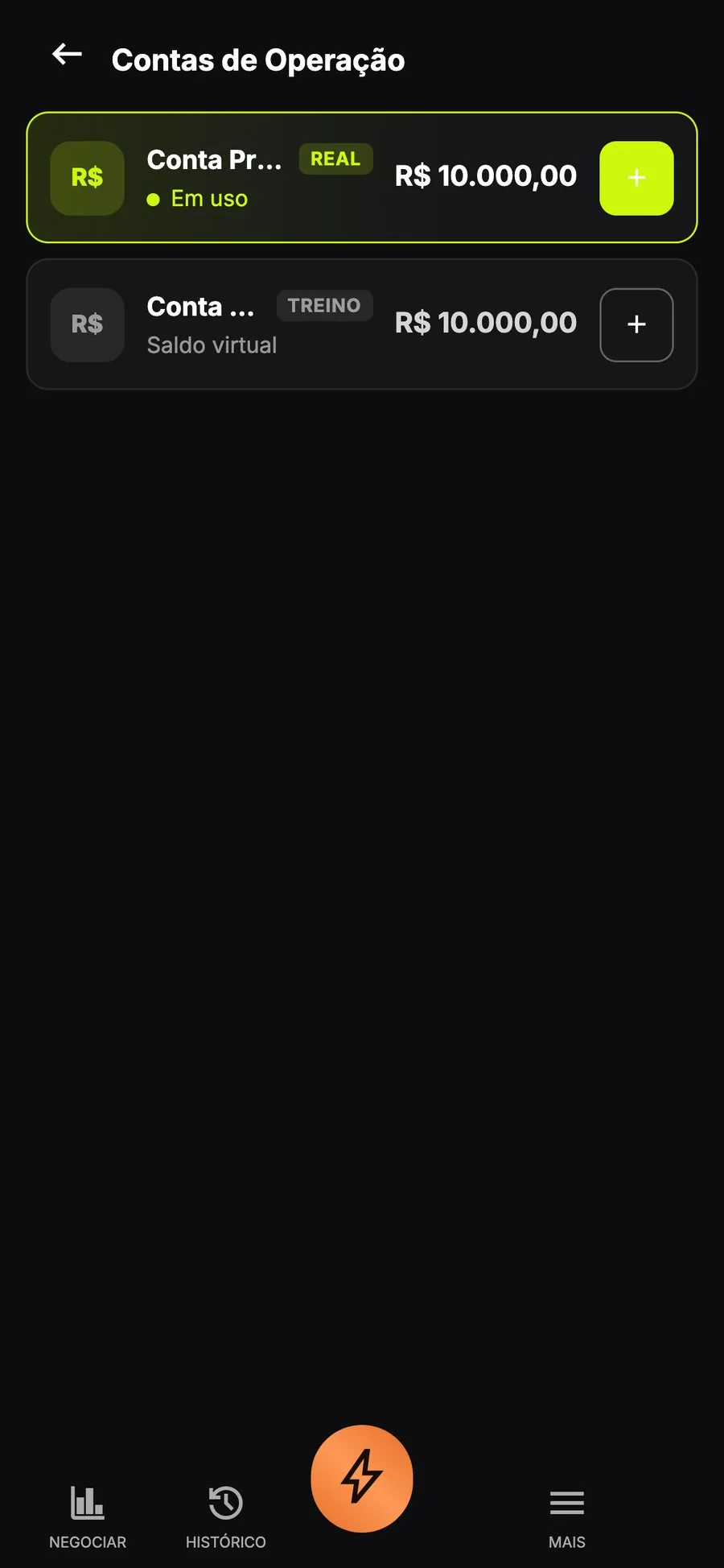
Your main account is tagged REAL.
Back on the chart, check the top of the screen: it should say Conta Principal, with your real balance.

With the main account on, the balance is your real balance.
Make your deposit
If you haven't deposited yet, tap Deposit. The minimum is R$ 50. See the steps in How to deposit.
Start with a small amount
On your first real trade, use a low amount, so you get used to the real account without pressure. The buttons are the same as on the demo: pick the asset, set the Amount and Expiry, and tap Buy or Sell.
Check before you confirm
- Are you on your main account, not the demo?
- Is the asset the one you wanted?
- Are the amount and time right?
- Did you see the Return shown before you confirm?
Trading involves risk. Only use money you can afford to lose.
What next?
The result goes to your balance when the time runs out, and the details stay in History. When you want to cash out, see How to withdraw.